
INTRODUCTION:
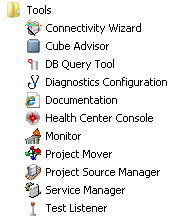
Pre-MicroStrategy 9.3.x the configuration process was done by launching a separate application under the Tools folder in the start menu. This process is define in TN32554 - How to Configure a MicroStrategy Health Center system. Now the "Health Center Configuration Wizard" is no longer under the Tools folder (shown below) since this is now handled by the configuration wizard.
The Master Health Agent (MHA) machine serves as the hub of the Health Center system. It keeps track of the scheduled system checks for itself and the connected Health Agents, and triggers those system checks at the appropriate times. It also stores the network topology for the system, and transmits diagnostic packages to MicroStrategy Technical Support.
Other MicroStrategy machines are Health Agents (HA). These machines perform system checks on themselves when scheduled to do so by the Master Health Agent, and report the results of those checks.
CONFIGURING A MACHINE AS A MASTER HEALTH AGENT:
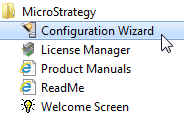
1. Launch MicroStrategy Configuration Wizard under the Start Menu -> MicroStrategy as shown below
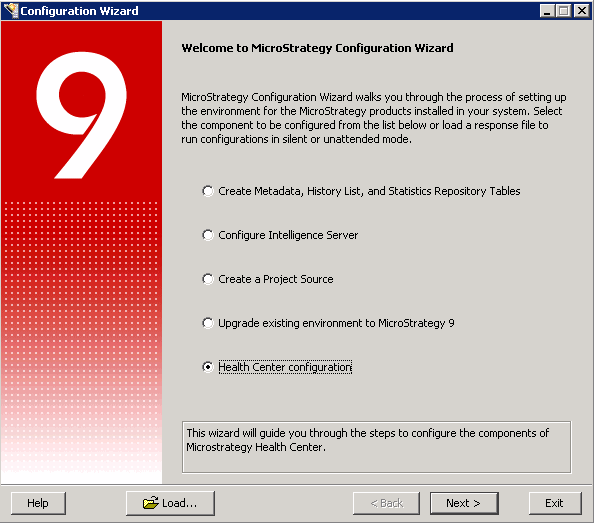
2. Select "Health Center Configuration" as shown below for "This wizard will guide you through the steps to configure the components of MicroStrategy Health Center"
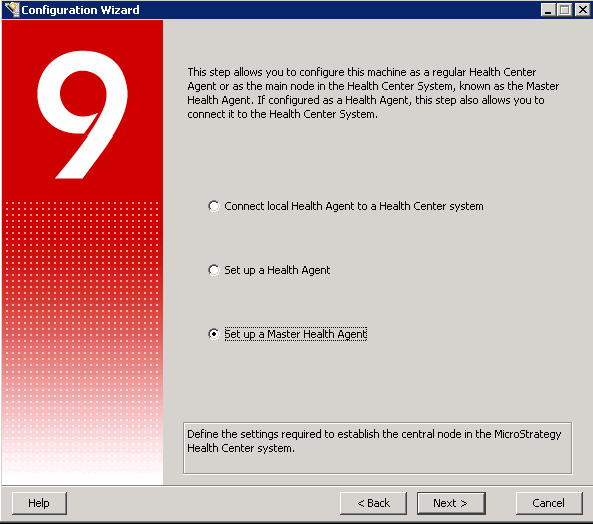
3. Select "Set up a Health Agent" as shown below to "Define the settings that specify how the Health Center System will connect to this machine"
Comments